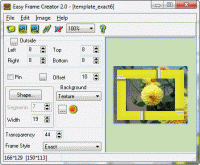
Easy Frame Creator is intended for quick and easy creation of image frames and unique collages on basis of prepared templates. Re-sizing, image rotation, different frame forms and styles, effects for image and texture, simultaneous use several frames
Easy Frame Creator is intended for quick and easy creation of framed images or single frames, unique collages and abstract pictures for theirs publication on the web.
Program features:
- loads source image from BMP, JPEG (JPG), GIF, PCX, PSD, PNG - files;
- rotates, flips, changes the size of the image, crops rectangular image patch;
- applies effects and corrects the image and texture;
- creates frame images on basis of prepared templates;
- adds new templates to the list;
- deletes templates from the list;
- adds background color, gradient or texture from BMP, JPEG ( JPG ), PSD, PCX, PNG and GIF - files;
- creates rectangular frames with opaque background outside of the source image;
- creates frames of the different forms and styles inside the source image;
- sets shape of inside frame and its parameters ( width and number of linear segments in curved shape of frame );
- sets style of inside frame and edits its parameters;
- allows to fill image area around inside frame by color, gradient or texture with different values of transparency;
- gives possibility to apply several frames and effects to the source image simultaneously;
- adds pin to the image;
- copies created image to clipboard in BMP - format;
- pastes image from clipboard;
- saves created image as GIF, BMP, PNG or JPEG - file;
- sets JPEG compression quality;
- supports internationalization. Whats new in version 2.3: * Windows 7-compatibility;
* Features added: new background style Gradient, new frame style Icon, operation File / Fix for fixing of framed current image as source image, pin in the frame corners;
* Improvement: indicator to display the time of frame building;
* Changed registration codes. Requirements: No special requirements Operating system: WinXP,WinVista,Win7 x32,Win7 x64,Windows2000,Win98,WinME,WinNT 3.x,WinNT 4.x,Win95 Limitations: Saved images with crossed blue lines. Release notes: Major Update
MagicBD is a graphic software which can be used to draw many kinds of iconographies, illustrations and sketch maps.It can also be used to edit images to process them or get some special effects.
Price: $28, Rating: 10, Downloads: 234 Download
Pos Free Photo Editor is a free photo editor from the authors of the best free professional photo editor - Photo Pos Pro free photo editor. The software is simple and very user friendly photo editor, that lets you easily view, and enhance your photos
Price: $0.00, Rating: 10, Downloads: 190 Download
Design over 10 photos by few mouse clicks. Easily create photo book, collage, calendar, greeting cards, wedding photos and more artworks.
Price: $39.95, Rating: 0, Downloads: 171 Download
Image Frame is a Photoshop-compatible plug-in for easy creation naturally-look 3D frame. Add frame and text to your photos. You can apply rectangular and elliptical frame, change frame profile, material, and lightening.
Price: $14.95, Rating: 10, Downloads: 160 Download
User Rating
Rating:2.2 out of
5 Based on13 ratings.
13 user reviews.

 Easy Frame Creator 2.3 details